What to do when calls disconnect or there’s no network signal on your Galaxy device
Important Note: The information on this page is for Hong Kong products only. Models, sequences or settings will vary depending on location and/or where the product had been purchased. To be redirected to your local support page please click here.
If your calls disconnect abruptly or there’s no network signal on your Galaxy device, it may be due to a device setting or a carrier related issue. Follow the guide below to inspect your device’s condition.
Before you try the recommendations below, be sure to check if your device's software and related apps are updated to the latest version. To update your mobile device's software, follow these steps:
Step 1. Go to Settings > Software update.
Step 2. Tap on Download and install.
Step 3. Follow the on-screen instructions.
Check your device settings
Device settings may be hindering your ability to make or receive calls. Check if Airplane mode is enabled or if your device is blocking calls from unknown or private numbers.
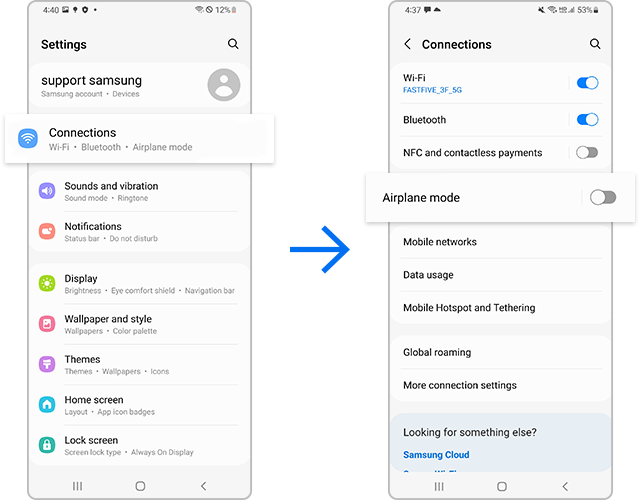
Turn off Airplane mode
Step 1. Open Settings and tap Connections.
Step 2. If Airplane mode is on, turn it off and check if your connection stabilizes.
Check if your device is blocking any unknown or private numbers


You may need to reset your network settings if your calls disconnect, or your device keeps losing network signal.


Note:
- Please note that resetting network settings will also reset Wi-Fi, Bluetooth, and other network settings.
Incorrect APN (Access Point Name) settings may interrupt the network connection. Follow the steps below to reconfigure APN settings.


The issue may occur when your device is connected to a carrier that you are not signed up for. Follow the steps below to choose your carrier.


Note: Device screenshots and menus may vary depending on the device model and software version.

If the above information does not match what your product is showing, you may check the User Manual for your product. If you are unable to solve the problem, please contact us for further assistance.
Thank you for your feedback!
Please answer all questions.
RC01_Static Content : This text is only displayed on the editor page