What is Screen recorder? What options do Screen recorder support?
Important Note: The information on this page is for Hong Kong products only. Models, sequences or settings will vary depending on location and/or where the product had been purchased. To be redirected to your local support page please click here.
Screen recorder is a new feature for users to record the screen easily.
You can start screen recording by touching the screen recorder icon in the Quick panel. After a countdown, recording will start.
• To write or draw on the screen, tap

Screen recorder offers options for sound, video quality, and selfie videos (PIP).
. Sound : No sound / Media sounds / Media sounds and mic
. Video quality : 1080p / 720p / 480p
. Selfie video size : Supports 5 levels of selfie size (※ Front camera only)
※ Screen Recorder :
Quick Panel > Tap the Screen recorder icon to start recording
To set Sound and Video quality, press and hold the recorder icon in the Quick panel.
Options for sound, video quality, and selfie video


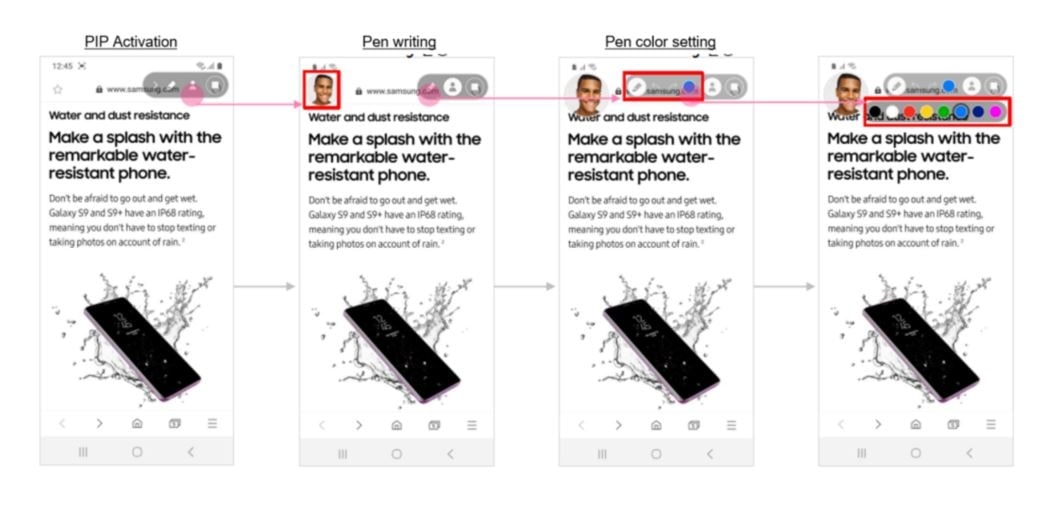
To record the screen overlaid with a selfie video, tap PIP : Picture-in-Picture feature

You can activate PIP and pen annotation at the same time.
When you finish recording, tap

The video will be saved in Gallery.
- All specifications and descriptions provided herein may be different from the actual specifications and descriptions for the product. Samsung reserves the right to make changes to this document and the product described herein, at anytime, without obligation on Samsung to provide notification of such change. All functionality, features, specifications, GUI and other product information provided in this document including, but not limited to, the benefits, design, pricing, components, performance, availability, and capabilities of the product are subject to change without notice or obligation. The contents within the screen are simulated images and are for demonstration purposes only.
If the above information does not match what your product is showing, you may check the User Manual for your product. If you are unable to solve the problem, please contact us for further assistance.
Thank you for your feedback!
Please answer all questions.
RC01_Static Content : This text is only displayed on the editor page