Restart your Galaxy phone regularly to prevent it from slowing down or freezing
Important Note: The information on this page is for Hong Kong products only. Models, sequences or settings will vary depending on location and/or where the product had been purchased. To be redirected to your local support page please click here.
If your phone's response has slowed down or freezes intermittently, you can visit a Samsung service center for help, but restart first to see if that solves the problem. Check out the guide below for more details.
Before you try the recommendations below, be sure to check if your device's software and related apps are updated to the latest version. To update your mobile device's software, follow these steps:
Step 1. Go to Settings > Software update.
Step 2. Tap on Download and install.
Step 3. Follow the on-screen instructions.
Make restarting your Galaxy phone a daily habit
Periodic restarting can prevent problems with your Galaxy phone. If your phone suddenly freezes or your phone is too slow, try restarting your phone first. The issue can sometimes be resolved just by restarting the phone. It is recommended to restart periodically to see if that solves the problem before visiting the Samsung service center.
How to automate periodic restarts
Galaxy phones can be set to automatically restart periodically. Follow the steps below to activate the Auto restart at set times feature.
Step 1. Open Settings, and then select Battery and device care.
Step 2. Tap the More options (the three vertical dots).

Step 3. Select Automation.
Step 4. Tap Auto restart at set times.

Step 5. Set the Schedule. Your phone will restart automatically within 1 hour of the time you set.
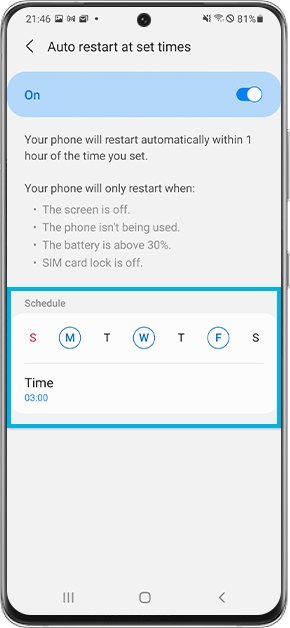
Your phone will only restart when:
- The screen is off.
- The phone isn't being used.
- The battery is above 30%.
- SIM card lock is off.
Note: Device screenshots and menus may vary depending on the device model and software version.

If the above information does not match what your product is showing, you may check the User Manual for your product. If you are unable to solve the problem, please contact us for further assistance.
Thank you for your feedback!
Please answer all questions.
RC01_Static Content : This text is only displayed on the editor page