How to use the AR Doodle feature in Note10
Important Note: The information on this page is for Hong Kong products only. Models, sequences or settings will vary depending on location and/or where the product had been purchased. To be redirected to your local support page please click here.
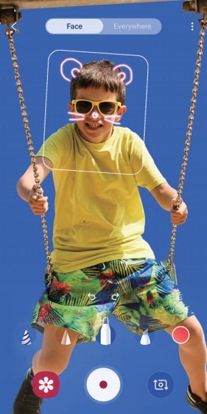
You can record fun videos with virtual handwriting or drawings on faces or anywhere else. When the camera recognises a face or space, the doodles on the face will follow the face as it moves, and the doodles in the space will be fixed in the same place even if the camera moves.
 and select the mode you want. When the camera recognises the subject, the recognition area will appear on the screen.
• Face: Doodle on a face.
• Everywhere: Doodle anywhere else.
 and then begin to doodle, you can record yourself doodling.
to record a video.
and then begin to doodle, you can record yourself doodling.
to record a video.
 to stop recording the video. You can view and share the video in Gallery.
If the above information does not match what your product is showing, you may check the User Manual for your product. If you are unable to solve the problem, please contact us for further assistance.
Thank you for your feedback!
Please answer all questions.
RC01_Static Content : This text is only displayed on the editor page