How to fast charge on your Galaxy device
Important Note: The information on this page is for Hong Kong products only. Models, sequences or settings will vary depending on location and/or where the product had been purchased. To be redirected to your local support page please click here.
The latest Galaxy mobile devices are equipped with an internal coil for wireless fast charging and wired adaptive fast charging, a built-in feature that allows the battery to charge much quicker.
Check out how to enable the fast-charge feature on your mobile devices and how to properly plug in the USB cable to the charging adapter. Also, view the types of authorized wired and wireless chargers available to use for your mobile devices.
How to enable the fast-charge or fast wireless charge feature for Galaxy mobile devices
Step 1. Go to Settings > Device Care.
Step 2. Tap on the Battery icon.

Step 3. Tap the Charging menu.
Select one of the charging modes below, based on the type of authorized fast charger you have.
To enable any one of the charging modes, simply tap the switch to the right-side.
- Fast charging : Enable this mode if you are using the Adaptive fast wired charger.
- Super fast charging : Enable this mode if you are using a wired Super fast charger.
- Fast wireless charging : Enable this mode if you are using a fast wireless charging pad.
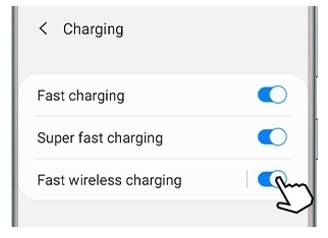
Note: While charging, you can't enable or disable this feature on your device.
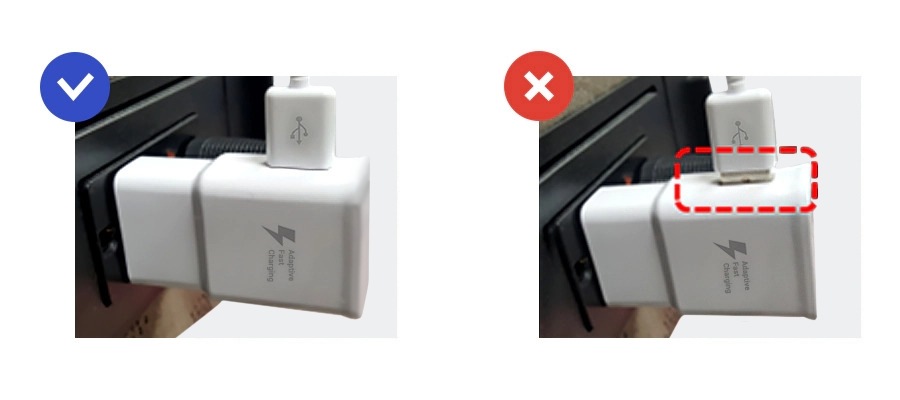
If the USB cable is not properly inserted into the charger, your device will not be able to fast charge even if you are using a fast charger.
Please check if the USB cable is securely inserted into the charger. Otherwise, the fast charging feature will not work, and your mobile device will receive very slow charging capacity.
Your charging speed will slow down, and it will take longer for the battery to fully charge.
Diagram of how to correctly insert the USB cable into the charger:
When you charge the battery using a standard charger, the fast charging feature will not be available.
To use the fast charging feature, you need to use a wired charger that supports fast charging.
Charging speed may vary depending on actual usage, charging conditions, and other factors. It is recommended to use the charging cable and travel charger included in the box for the best charging performance.
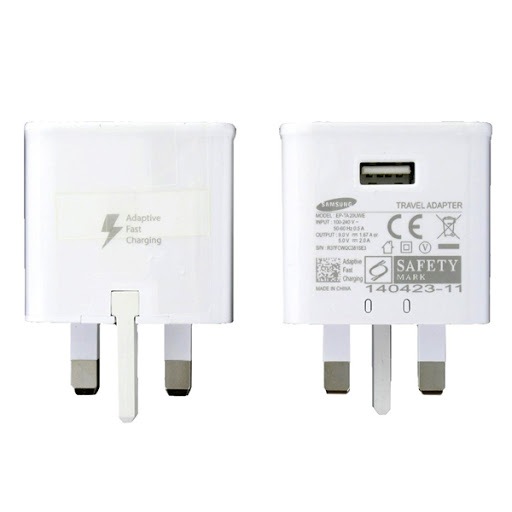
For Samsung genuine fast chargers, including wired and wireless types, please refer to the following images of charger types.
Samsung's genuine wired charger
Universal fast travel charger
Samsung's genuine wireless fast charging pad
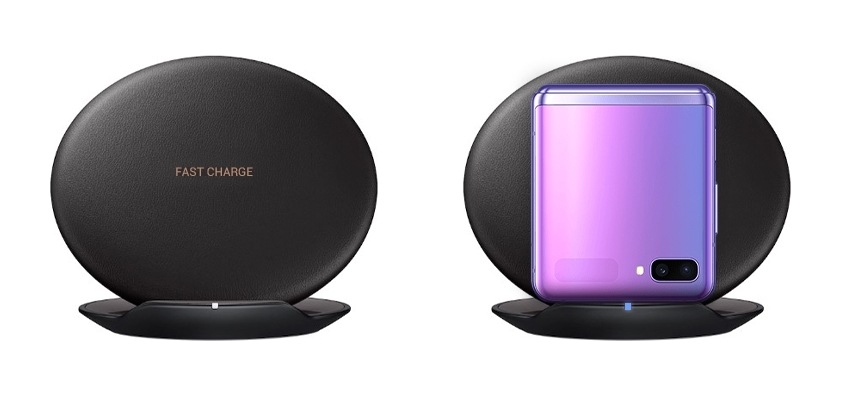
Please note:
- When performing wireless fast charging, you may observe a slight sound generated by the cooling fan inside the charging pad..
- If the device heats up or the ambient temperature rises, the charging speed may automatically slow down. This is a normal operation to prevent device damage, so please use it with confidence.
- It is recommended to turn off the device or the screen to increase the charging speed.
- Only devices with wireless charging functionality are supported. Depending on the device model, the availability of the super fast charging feature may vary.
Note: Device screenshots and menu may vary depending on the device model and software version.
If the above information does not match what your product is showing, you may check the User Manual for your product. If you are unable to solve the problem, please contact us for further assistance.
Thank you for your feedback!
Please answer all questions.
RC01_Static Content : This text is only displayed on the editor page