After updating Galaxy S21 series, charging information is not displayed on Lock screen.
Important Note: The information on this page is for Hong Kong products only. Models, sequences or settings will vary depending on location and/or where the product had been purchased. To be redirected to your local support page please click here.
After updating Galaxy S21/S21+/S21 Ultra to the latest, charging information on Lock screen is no displayed more after device is fully charged. Before update, device continued to show charging information regardless of battery level during charging and it was also even when device was fully charged.
To minimize battery power’s consumption related to charging information displayed on Lock screen, a new concept is applied from Android R OS devices.
According to this, when Show charging information (Settings > Display > Show charging information) option is activated on new Android R OS software version, the battery level and estimated time that had been exposed continuously to the Lock screen while charging appear only for 5 minutes after fully charging. This is a new concept to prevent battery consumption due to unnecessary screen turn on after full charging.

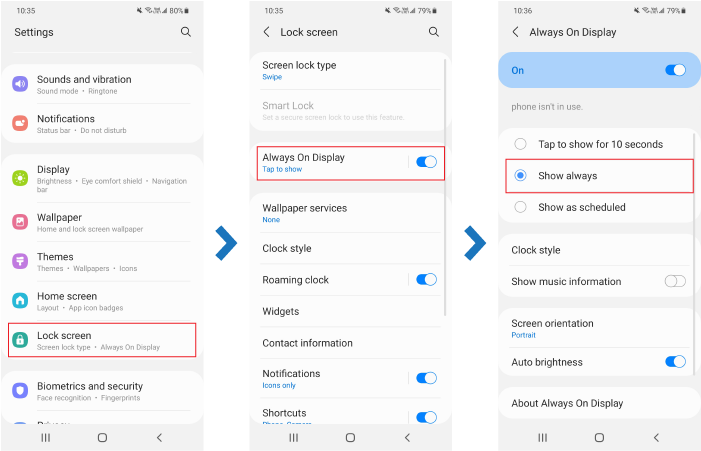
If you turn on the Show always of Always On Display(Settings > Lock screen > Always On Display) feature, charging information is displayed along with the clock information even after being fully charged as before.
If the above information does not match what your product is showing, you may check the User Manual for your product. If you are unable to solve the problem, please contact us for further assistance.
Thank you for your feedback!
Please answer all questions.
RC01_Static Content : This text is only displayed on the editor page