How to run a Monitor Self-Test?
Important Note: The information on this page is for Hong Kong products only. Models, sequences or settings will vary depending on location and/or where the product had been purchased. To be redirected to your local support page please click here.
Follow the Guide Below:
1.Power off both your computer and the monitor.
2.Disconnect the signal cable from the back of the computer.
3.Power on the monitor.
Note:Depending on your monitor, While in the Self-Test mode, the monitor's LED power indicator remains on and the Check Signal Cable figure moves around on the screen.
If your monitor alternate between 2 boxes Analog and Digital that is normal, as some monitors supports both Digital and analog signal.
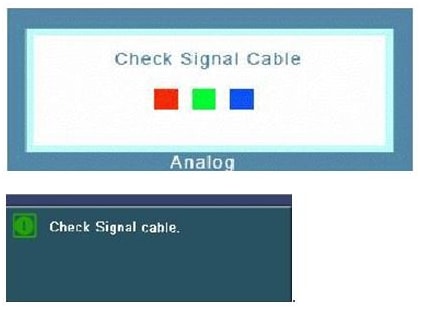
Test Results:
a) If you see any of the above check cable signals, that mean the problem is not related to your monitor, please check your graphics card.
b) If you see the first figure with one of the colors missing, that means your monitor requires service.) If you are unable to see any of the figures. But the light of the monitor is on, it means your monitor requires service.
If the above information does not match what your product is showing, you may check the User Manual for your product. If you are unable to solve the problem, please contact us for further assistance.
Thank you for your feedback!
Please answer all questions.
RC01_Static Content : This text is only displayed on the editor page